TGI简介
Text Generation Inference(TGI)是一个用于部署和提供大型语言模型(LLMs)服务的工具包。TGI支持高性能文本生成,适用于最受欢迎的开源大语言模型,包括Llama、Falcon、StarCoder、BLOOM、GPT-NeoX和T5。
TGI是一个基于 Rust、Python 和 gRPC 的文本生成推理服务器,已在Hugging Face的生产环境中使用,用于支持Hugging Chat、推理API和推理端点。
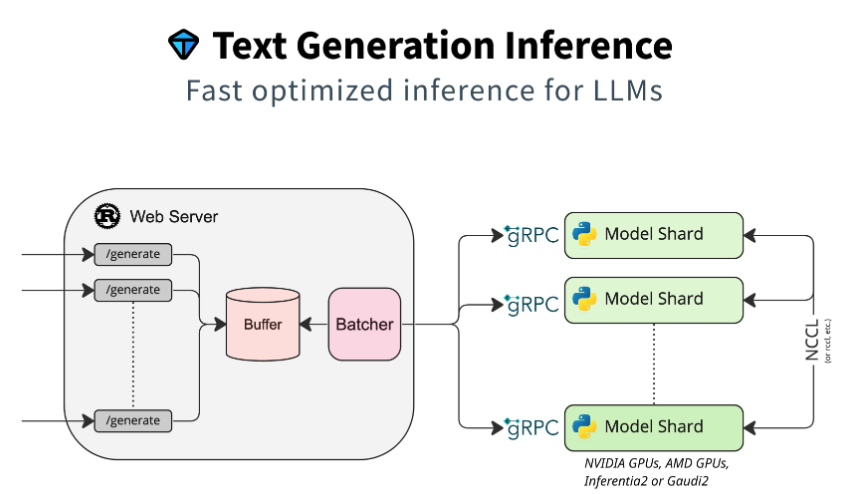
Text Generation Inference实现了多项优化和功能,例如:
- 简易启动器,支持大多数流行的大语言模型的服务
- 已适用于生产环境(支持 Open Telemetry 的分布式追踪和 Prometheus 指标)
- 使用张量并行加速多 GPU 的推理过程
- 基于服务器发送事件(SSE)的 Token 流式传输
- 持续批处理传入请求,提高整体吞吐量
- 针对推理优化的 Transformers 代码,支持在最常用架构上应用Flash Attention和Paged Attention
- 通过bitsandbytes和GPT-Q进行量化
- 支持Safetensors格式的权重加载
- 使用“大语言模型水印(A Watermark for Large Language Models)”功能进行水印嵌入
- Logits 参数调节((temperature scaling, top-p, top-k, repetition penalty)
- 停止序列
- Log概率记录
- 微调支持:使用微调模型执行特定任务,以获得更高的准确性和性能。
- 指导功能(Guidance):强制模型生成基于用户自定义输出结构的结构化输出,实现函数调用和工具使用。
Text Generation Inference 已被多个项目用于生产环境,例如:
- Hugging Chat:一个支持开放模型访问的开源界面,如 Open Assistant 和 Llama
- OpenAssistant:一个开源社区项目,致力于在公开环境中训练大语言模型
- nat.dev:一个用于探索和比较大语言模型的实验平台。
TGI支持的模型
Text Generation Inference支持优化模型的服务。Supported Models中列出了支持的模型(VLMs & LLMs)。
本地安装和运行
本地安装
可以选择在本地安装TGI。
首先安装 Rust,可参考“安装Rust”。
创建一个Python虚拟环境(至少使用Python 3.9):
python3.11 -m venv text-generation-inference
source text-generation-inference/bin/activate
安装protoc:
PROTOC_ZIP=protoc-21.12-linux-x86_64.zip
curl -OL https://github.com/protocolbuffers/protobuf/releases/download/v21.12/$PROTOC_ZIP
sudo unzip -o $PROTOC_ZIP -d /usr/local bin/protoc
sudo unzip -o $PROTOC_ZIP -d /usr/local 'include/*'
rm -f $PROTOC_ZIP
接下来从源码编译安装TGI:
cd text-generation-inference
git clone https://github.com/huggingface/text-generation-inference.git
cd text-generation-inference
# 将使用tag v2.4.0构建
git checkout -b tobuild v2.4.0

export PIP_INDEX_URL=https://mirrors.aliyun.com/pypi/simple
BUILD_EXTENSIONS=True make install -j 4
注意
在某些机器上,可能还需要安装编译和构建的工具:
sudo apt-get install libssl-dev gcc
sudo apt install cmake编译安装后,会在~/.cargo/bin目录下安装text-generation-launcher和text-generation-router两个二进制文件。
text-generation-launcher --version
text-generation-launcher 2.4.0
运行模型
下面讲使用text-generation-launcher运行模型,注意使用text-generation-launcher命令前,需要确保前面创建的python虚拟环境text-generation-inference处于激活状态。
这里使用Qwen/Qwen2.5-7B-Instruct(模型已经预先下载好):
export PYTORCH_CUDA_ALLOC_CONF=expandable_segments:True
export HF_HUB_OFFLINE=1


text-generation-launcher --model-id Qwen/Qwen2.5-7B-Instruct \
   --max-total-tokens=32768 \
   --max-input-tokens=32767 \
   --port 8000

# text-generation-launcher --model-id Qwen/Qwen2.5-7B-Instruct \
#    --max-total-tokens=16384 \
#    --max-input-tokens=16383 \
# --port 8000上面的命令报了ModuleNotFoundError: No module named 'dropout_layer_norm'的错误,根据issues 1961中的内容,安装CUDA扩展layer_norm,具体链接https://github.com/Dao-AILab/flash-attention/tree/main/csrc/layer_norm。
安装后启动正常。
启动服务器后,可以通过请求来使用生成接口/generate或兼容OpenAI Chat Completion API的消息API/v1/chat/completions。有关API的更多信息,请查阅 text-generation-inference的OpenAPI文档。
curl -s localhost:8000/v1/models | jq .

{
  "object": "list",
  "data": [
    {
      "id": "Qwen/Qwen2.5-7B-Instruct",
      "object": "model",
      "created": 0,
      "owned_by": "Qwen/Qwen2.5-7B-Instruct"
    }
  ]
}
curl -s http://localhost:8000/v1/chat/completions -H "Content-Type: application/json" -d '{
"model": "Qwen/Qwen2.5-7B-Instruct",
"messages": [
{"role": "system", "content": "你是一个数学家."},
{"role": "user", "content": "9.11和9.8这两个小数谁比较大?"}
],
"max_tokens": 512
}' | jq '.choices[0].message.content'
"比较9.11和9.8这两个小数时,可以从整数部分和小数部分依次比较。\n\n1. 首先比较整数部分:9和9,两者相同。\n2. 然后比较小数部分的第一位:1和8。这里的1小于8,因此9.11小于9.8。\n\n因此,9.8比9.11大。"curl -s http://localhost:8000/v1/chat/completions -H "Content-Type: application/json" -d '{
"model": "Qwen/Qwen2.5-7B-Instruct",
"messages": [
{ "role": "user", "content": "What is 3 * 12? Also, what is 11 + 49?" }
],
"parallel_tool_calls": false,
"tools": [
{
"type": "function",
"function": {
"name": "add",
"description": "Add two integers.",
"parameters": {
"type": "object",
"properties": {
"a": {"type": "integer"},
"b": {"type": "integer"}
},
"required": ["a", "b"]
}
}
},
{
"type": "function",
"function": {
"name": "multiply",
"description": "Multiply two integers.",
"parameters": {
"type": "object",
"properties": {
"a": {"type": "integer"},
"b": {"type": "integer"}
},
"required": ["a", "b"]
}
}
}
]
}' | jq '.choices[0].message.tool_calls'容器化运行TGI
不建议从源代码安装TGI。而是推荐通过Docker使用TGI。
这里在TGI容器中运行Qwen/Qwen2.5-7B-Instruct(模型已经预先下载好):
model=Qwen/Qwen2.5-7B-Instruct
volume=$HOME/.cache/huggingface # share a volume with the Docker container to avoid downloading weights every run

sudo docker run --name tgi --restart=unless-stopped -d --gpus all --shm-size 2g -p 8000:80 -v $volume:/data \
    -e HF_HUB_OFFLINE=1 \
    ghcr.io/huggingface/text-generation-inference:2.4.0 \
    --max-total-tokens=32768 \
    --max-input-tokens=32767 \
    --model-id $model


# sudo docker run --name tgi --restart=unless-stopped -d --gpus all --shm-size 2g -p 8000:80 -v $volume:/data \
#     -e HF_HUB_OFFLINE=1 \
#     ghcr.io/huggingface/text-generation-inference:2.4.0 \
#     --max-total-tokens=16384 \
#     --max-input-tokens=16383 \
#     --model-id $model